Stripe Payment Links
Attribute no-code Stripe Payment Links directly or through a tracked return URL.
Payment Links need no custom checkout endpoint. Talivia supports a direct link signal and a return-URL fallback.
Direct attribution from the link
When the Talivia tracker sees a standard https://buy.stripe.com/... anchor, it adds the current session as Stripe's client_reference_id before navigation.
<a href="https://buy.stripe.com/test_123">Buy now</a>Stripe includes that reference on the resulting Checkout Session, and Talivia uses it when the payment webhook arrives.
Talivia never overwrites an existing client_reference_id. If your product already uses that parameter for a cart or customer ID, configure the return URL below as the attribution signal.
Automatic decoration has boundaries. It applies to normal links on buy.stripe.com. A custom Stripe domain or navigation performed directly with window.location should use the return URL or your own Checkout Session integration.
Configure the return URL
- Open the Payment Link in the Stripe Dashboard.
- Open After payment.
- Choose Redirect customers to your website.
- Set the URL to include Stripe's literal placeholder:
https://your-site.com/thanks?session_id={CHECKOUT_SESSION_ID}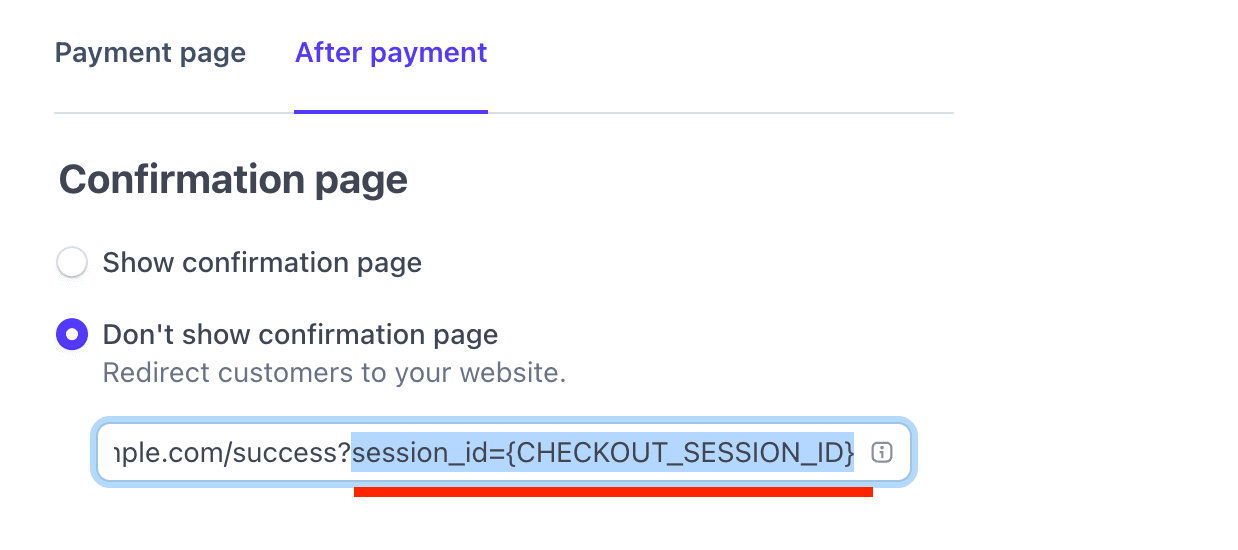
Keep the Talivia tracker installed on the destination page. Talivia detects the Checkout Session ID, matches it with the verified Stripe webhook, and recalculates attribution even if the webhook arrived before the browser returned.
The return method works best when checkout and the destination page are opened in the same browser. Direct client_reference_id attribution does not depend on the customer returning after payment.